Arduino Meets LLMs: Building a Voice-Controlled IoT System
How I bridged physical hardware and AI by connecting an Arduino to Large Language Models for voice-controlled actions.
Arduino Meets LLMs: Voice-Controlled IoT
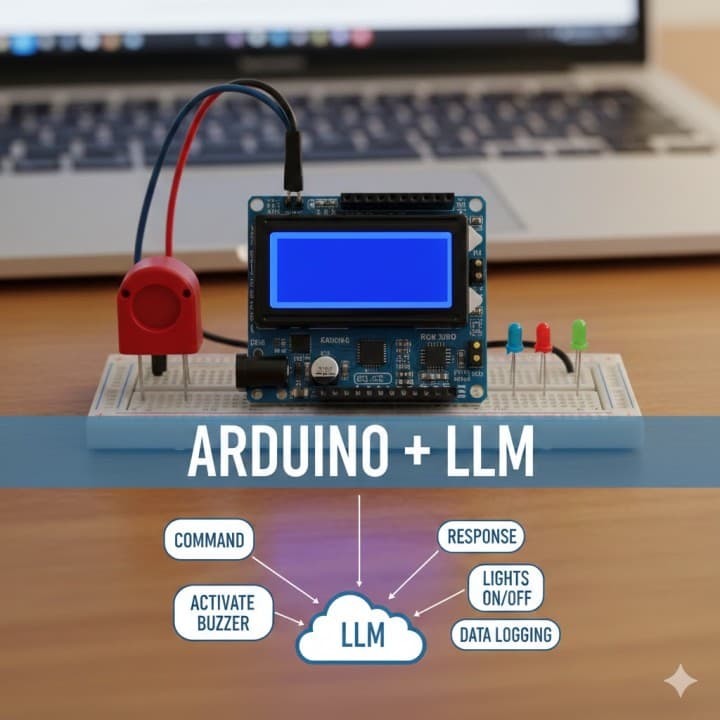
What happens when you combine a $10 Arduino board with the intelligence of Large Language Models? You get a device that understands natural language and responds with real-world actions.
In this post, I'll break down how I built a system where you can speak to your Arduino, and it intelligently responds by activating hardware or displaying information.
The Big Picture
🎤 Voice → Audio LLM → Text → Thinking LLM → Action → Arduino → 💡🔊📟
The pipeline has four stages:
- Record — Press a button on the Arduino, speak your command
- Transcribe — Audio is sent to an Audio LLM for speech-to-text
- Think — The transcribed text goes to a Thinking LLM that determines the intent and action
- Act — The response is sent back to Arduino, which executes the command
Hardware Setup
You'll need:
- Arduino Uno/Nano (or any compatible board)
- Microphone module (e.g., MAX9814)
- Push button (for recording trigger)
- 16x2 LCD display (for showing responses)
- Buzzer (for audio feedback)
- LEDs (for visual feedback)
- WiFi module (ESP8266/ESP32) or connect via USB to a computer
Wiring
Button → Pin 2 (Digital Input)
Microphone → A0 (Analog Input)
LCD → I2C (SDA → A4, SCL → A5)
Buzzer → Pin 8 (Digital Output)
LED Red → Pin 10
LED Green → Pin 11
LED Blue → Pin 12
The Backend (Node.js)
The Arduino communicates with a Node.js server that orchestrates the LLM calls:
const express = require('express');
const { SerialPort } = require('serialport');
const multer = require('multer');

const app = express();
const upload = multer({ storage: multer.memoryStorage() });

// Serial connection to Arduino
const port = new SerialPort({ path: '/dev/ttyUSB0', baudRate: 9600 });

// Receive audio from Arduino, process with LLMs
app.post('/process-audio', upload.single('audio'), async (req, res) => {
  const audioBuffer = req.file.buffer;

  // Step 1: Transcribe audio
  const transcription = await transcribeAudio(audioBuffer);
  console.log('Heard:', transcription);

  // Step 2: Process with Thinking LLM
  const action = await processCommand(transcription);
  console.log('Action:', action);

  // Step 3: Send action to Arduino
  port.write(action.command + '\n');

  res.json({ transcription, action });
});
The Audio LLM (Transcription)
For speech-to-text, I use a lightweight model that handles noisy audio well:
async function transcribeAudio(audioBuffer) {
  const response = await fetch('YOUR_AUDIO_LLM_ENDPOINT', {
    method: 'POST',
    headers: { 'Content-Type': 'audio/wav' },
    body: audioBuffer,
  });

  const result = await response.json();
  return result.text;
}
You can use OpenAI Whisper, a self-hosted Whisper model, or any speech-to-text API.
The Thinking LLM (Intent Processing)
This is where the magic happens. The Thinking LLM receives the transcribed text and decides what action to take:
async function processCommand(text) {
  const systemPrompt = `You are an IoT controller. Given a voice command,
  respond with a JSON action. Available actions:
  - BUZZER_ON / BUZZER_OFF
  - LED_RED / LED_GREEN / LED_BLUE / LED_OFF
  - DISPLAY:{message} (show text on LCD)
  - NONE (if command is unclear)

  Respond ONLY with valid JSON: {"command": "ACTION", "display": "message"}`;

  const response = await fetch('YOUR_LLM_ENDPOINT', {
    method: 'POST',
    headers: { 'Content-Type': 'application/json' },
    body: JSON.stringify({
      messages: [
        { role: 'system', content: systemPrompt },
        { role: 'user', content: text }
      ]
    }),
  });

  const result = await response.json();
  return JSON.parse(result.choices[0].message.content);
}
Example Interactions
| Voice Command | Transcription | LLM Output | Arduino Action |
|--------------|---------------|------------|----------------|
| "Turn on the red light" | "turn on the red light" | {"command": "LED_RED"} | Red LED turns on |
| "What time is it?" | "what time is it" | {"command": "DISPLAY:14:30", "display": "It's 2:30 PM"} | LCD shows time |
| "Sound the alarm" | "sound the alarm" | {"command": "BUZZER_ON"} | Buzzer activates |
| "Everything off" | "everything off" | {"command": "LED_OFF,BUZZER_OFF"} | All outputs turn off |
Arduino Code
The Arduino listens for serial commands and executes them:
#include <LiquidCrystal_I2C.h>

LiquidCrystal_I2C lcd(0x27, 16, 2);
const int buzzerPin = 8;
const int ledRed = 10;
const int ledGreen = 11;
const int ledBlue = 12;

void setup() {
  Serial.begin(9600);
  lcd.init();
  lcd.backlight();
  pinMode(buzzerPin, OUTPUT);
  pinMode(ledRed, OUTPUT);
  pinMode(ledGreen, OUTPUT);
  pinMode(ledBlue, OUTPUT);
  lcd.print("Ready...");
}

void loop() {
  if (Serial.available()) {
    String command = Serial.readStringUntil('\n');
    command.trim();
    executeCommand(command);
  }
}

void executeCommand(String cmd) {
  if (cmd == "BUZZER_ON") digitalWrite(buzzerPin, HIGH);
  else if (cmd == "BUZZER_OFF") digitalWrite(buzzerPin, LOW);
  else if (cmd == "LED_RED") { allLedsOff(); digitalWrite(ledRed, HIGH); }
  else if (cmd == "LED_GREEN") { allLedsOff(); digitalWrite(ledGreen, HIGH); }
  else if (cmd == "LED_BLUE") { allLedsOff(); digitalWrite(ledBlue, HIGH); }
  else if (cmd == "LED_OFF") allLedsOff();
  else if (cmd.startsWith("DISPLAY:")) {
    lcd.clear();
    lcd.print(cmd.substring(8));
  }
}

void allLedsOff() {
  digitalWrite(ledRed, LOW);
  digitalWrite(ledGreen, LOW);
  digitalWrite(ledBlue, LOW);
}
What I Learned
- Latency matters — The full pipeline (record → transcribe → think → act) takes 2-4 seconds. Acceptable for IoT, but there's room to optimize
- Prompt engineering is critical — The Thinking LLM needs very clear instructions about available actions and output format
- Error handling is essential — What if the LLM returns invalid JSON? What if the audio is too noisy? Always have fallbacks
- Small models work fine — You don't need GPT-4 for intent classification. A small fine-tuned model can handle this perfectly
What's Next
- Wake word detection — "Hey Arduino" instead of a button press
- Multi-turn conversations — Context-aware follow-up commands
- Sensor integration — "What's the temperature?" reads from a sensor and responds
- Edge inference — Run a tiny LLM directly on an ESP32
The future of IoT is conversational. We're just getting started.
Interested in IoT + AI projects? Let's connect on LinkedIn.