How I Built an Automated Lead Scraper for Google Maps
The technical story behind building a lead generation tool that scrapes Google Maps, cleans data, detects emails, and delivers results to your inbox.
Building an Automated Lead Scraper for Google Maps
Finding business leads is a pain. You search Google Maps, click through listings one by one, copy phone numbers, hunt for emails — it's mind-numbing work that eats hours.
So I automated the entire thing.
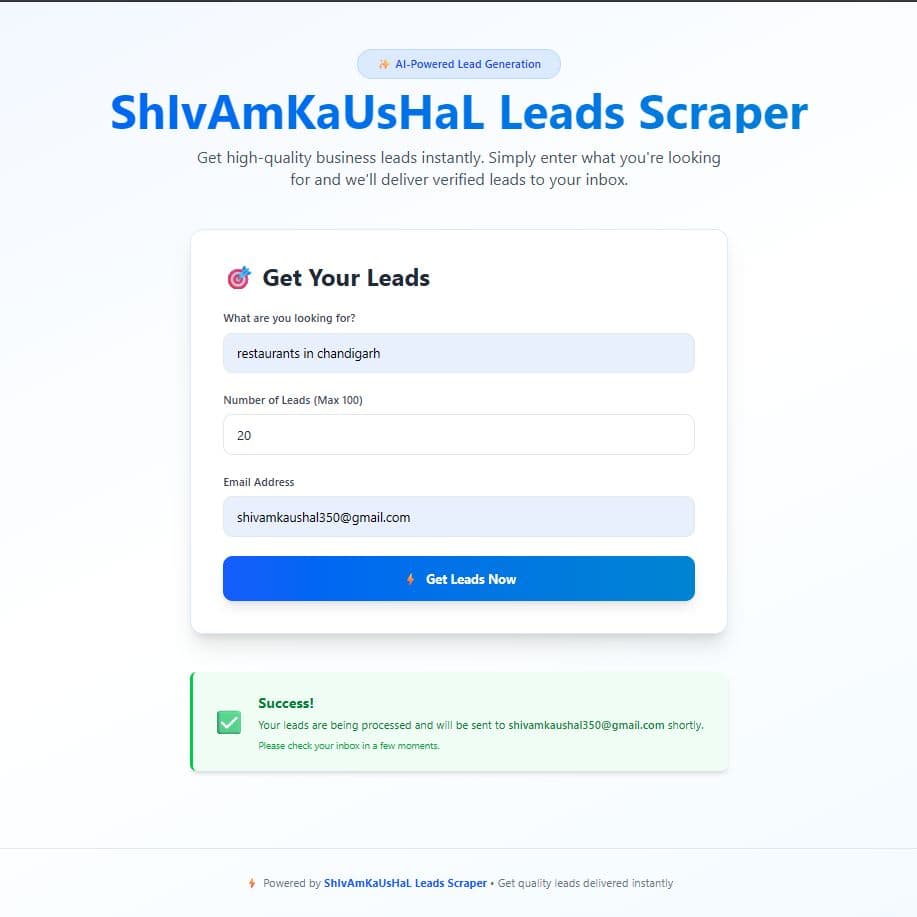
Lead Scraper lets you enter a search query (like "restaurants in Chandigarh"), choose how many leads you want, provide your email, and receive a clean, structured leads list in your inbox.
The Problem
Small businesses and freelancers need leads, but:
- Manual scraping takes hours for even 50 leads
- Existing tools charge $50-200/month
- Data quality is often terrible — duplicates, missing info, outdated numbers
- Email detection is almost never included
I wanted something that's fast, accurate, and affordable.
Architecture
User Input → Google Maps Scraping → Data Cleaning → Email Detection → CSV Export → Email Delivery
Tech Stack
- Frontend: Next.js + Tailwind CSS
- Backend: Node.js + Express.js
- Database: MongoDB (for caching and job management)
- Scraping: Puppeteer (headless Chrome)
- Email: Nodemailer + SMTP
Step 1: Scraping Google Maps
Google Maps doesn't have a public API for search results (the Places API is limited and expensive). So I use Puppeteer to automate a real browser:
const puppeteer = require('puppeteer');

async function scrapeGoogleMaps(query, count) {
  const browser = await puppeteer.launch({ headless: true });
  const page = await browser.newPage();

  await page.goto(`https://www.google.com/maps/search/${encodeURIComponent(query)}`);

  // Scroll to load more results
  const results = [];
  while (results.length < count) {
    await autoScroll(page);
    const newResults = await extractResults(page);
    results.push(...newResults);
  }

  await browser.close();
  return results.slice(0, count);
}
Each result extracts:
- Business name
- Address
- Phone number
- Rating and review count
- Website URL
- Business category
Step 2: Data Cleaning
Raw scraped data is messy. The cleaning pipeline handles:
function cleanData(results) {
  return results
    .filter(r => r.name && r.name.trim() !== '')     // Remove empty entries
    .filter(r => r.phone || r.website)                 // Must have contact info
    .map(r => ({
      ...r,
      phone: normalizePhone(r.phone),                  // Standardize format
      name: r.name.trim(),                             // Clean whitespace
      address: r.address?.replace(/\s+/g, ' ').trim(), // Normalize address
    }))
    .filter((r, i, arr) =>                             // Remove duplicates
      arr.findIndex(x => x.phone === r.phone) === i
    );
}
Step 3: Email Detection
This is the secret sauce. Most businesses don't list their email on Google Maps, but their website often has it. The email detector:
- Visits each business website
- Scans the page for email patterns
- Checks common pages (
/contact,/about,/team) - Extracts emails using regex + validation
async function detectEmail(websiteUrl) {
  const pagesToCheck = [
    websiteUrl,
    `${websiteUrl}/contact`,
    `${websiteUrl}/about`,
    `${websiteUrl}/contact-us`,
  ];

  for (const url of pagesToCheck) {
    try {
      const html = await fetchPage(url);
      const emails = extractEmails(html);
      if (emails.length > 0) return emails[0];
    } catch (e) {
      continue; // Page doesn't exist, try next
    }
  }

  return null;
}

function extractEmails(html) {
  const emailRegex = /[a-zA-Z0-9._%+-]+@[a-zA-Z0-9.-]+\.[a-zA-Z]{2,}/g;
  const matches = html.match(emailRegex) || [];

  // Filter out common false positives
  return matches.filter(email =>
    !email.includes('example.com') &&
    !email.includes('sentry.io') &&
    !email.includes('wixpress.com')
  );
}
Step 4: Export and Delivery
The cleaned data with detected emails is formatted as a CSV and emailed:
const createCsvStringifier = require('csv-writer').createObjectCsvStringifier;

function generateCSV(leads) {
  const csvStringifier = createCsvStringifier({
    header: [
      { id: 'name', title: 'Business Name' },
      { id: 'phone', title: 'Phone' },
      { id: 'email', title: 'Email' },
      { id: 'address', title: 'Address' },
      { id: 'rating', title: 'Rating' },
      { id: 'reviews', title: 'Reviews' },
      { id: 'website', title: 'Website' },
      { id: 'category', title: 'Category' },
    ],
  });

  return csvStringifier.getHeaderString() +
         csvStringifier.stringifyRecords(leads);
}
Challenges I Faced
Rate Limiting
Google Maps detects automated scraping. Solutions:
- Random delays between requests (2-5 seconds)
- Rotating user agents
- Proxy rotation for high-volume scraping
- Headless browser fingerprint randomization
Dynamic Content
Google Maps loads content dynamically. You can't just fetch the HTML — you need to:
- Wait for elements to render
- Scroll to trigger lazy loading
- Handle infinite scroll pagination
Email Accuracy
Not every string that looks like an email is a real email. I added:
- MX record validation — Check if the domain actually receives email
- Common pattern filtering — Remove
noreply@,support@, generic addresses - Deduplication — Same email appearing on multiple pages
Results
After launching:
- Average scraping time: 2-3 minutes for 100 leads
- Email detection rate: ~40% (not all businesses have discoverable emails)
- Data accuracy: 95%+ (after cleaning pipeline)
- User feedback: "This saved me 10+ hours of manual work"
Try It
The tool is live at leads.kaushalshivam.site. Enter your search, pick a count, and get leads delivered to your inbox.
Have ideas for improving lead generation? Connect with me on LinkedIn.